





Description
Dell Latitude E7270 Review: Is This Slightly Used Business Laptop Worth Buying?
Product Overview
The Dell Latitude E7270 is a compact business laptop built for people who want dependable performance without paying for a brand-new device. This particular unit comes in slightly used condition, backed by a 10-day checking warranty, which makes it a low-risk option for anyone shopping on a budget.
Dell has long been a trusted name in the business and enterprise laptop space, and the Latitude series is where that reputation really shows. These machines are designed for offices first, which means solid build quality, straightforward reliability, and hardware that just works day after day.
Under the hood, this Dell Latitude E7270 Core i5 6th gen model runs on a 6th generation Intel Core i5 chip. It’s not the newest silicon on the market, but for everyday computing tasks, it’s still perfectly capable. Paired with 8GB of DDR4 RAM and a fast 256GB SSD, overall performance stays smooth for browsing, office work, and light multitasking.
This laptop is best suited for students, office employees, freelancers, and anyone who mainly needs a machine for typing, browsing, video calls, and everyday productivity apps. It’s not built for gaming or heavy creative work, and it’s honest to say so upfront.
Why is this laptop worth buying? Because it delivers business-grade durability, a fast SSD, and a trusted Dell badge at a fraction of the price of a new machine. For anyone who just needs a reliable device for work or study, it checks the right boxes.
Quick buying summary: A slightly used, well-tested Dell Latitude with a 6th Gen Core i5 processor, 8GB RAM, and 256GB SSD — ideal for office work, online classes, and daily browsing, but not for gaming or heavy editing.
Specifications
| Feature | Details |
| Condition | Slightly Used |
| Brand & Model | Dell Latitude E7270 |
| Processor | Core i5 6th Generation |
| RAM | 8 Gigabytes DDR4 |
| Storage | 256 Gigabytes SSD |
| Graphics | Intel HD 520 |
| Display Size | 12.5″ |
| Touchscreen | No |
| Operating System | Windows 10 Pro |
| Bluetooth | Yes |
| Wi-Fi | Yes |
| USB | Yes |
| Webcam | Yes |
| Charger Included | Yes |
| Battery Backup | Up to 2 hours |
| Warranty | 10-Day Checking Warranty |
Design & Build Quality
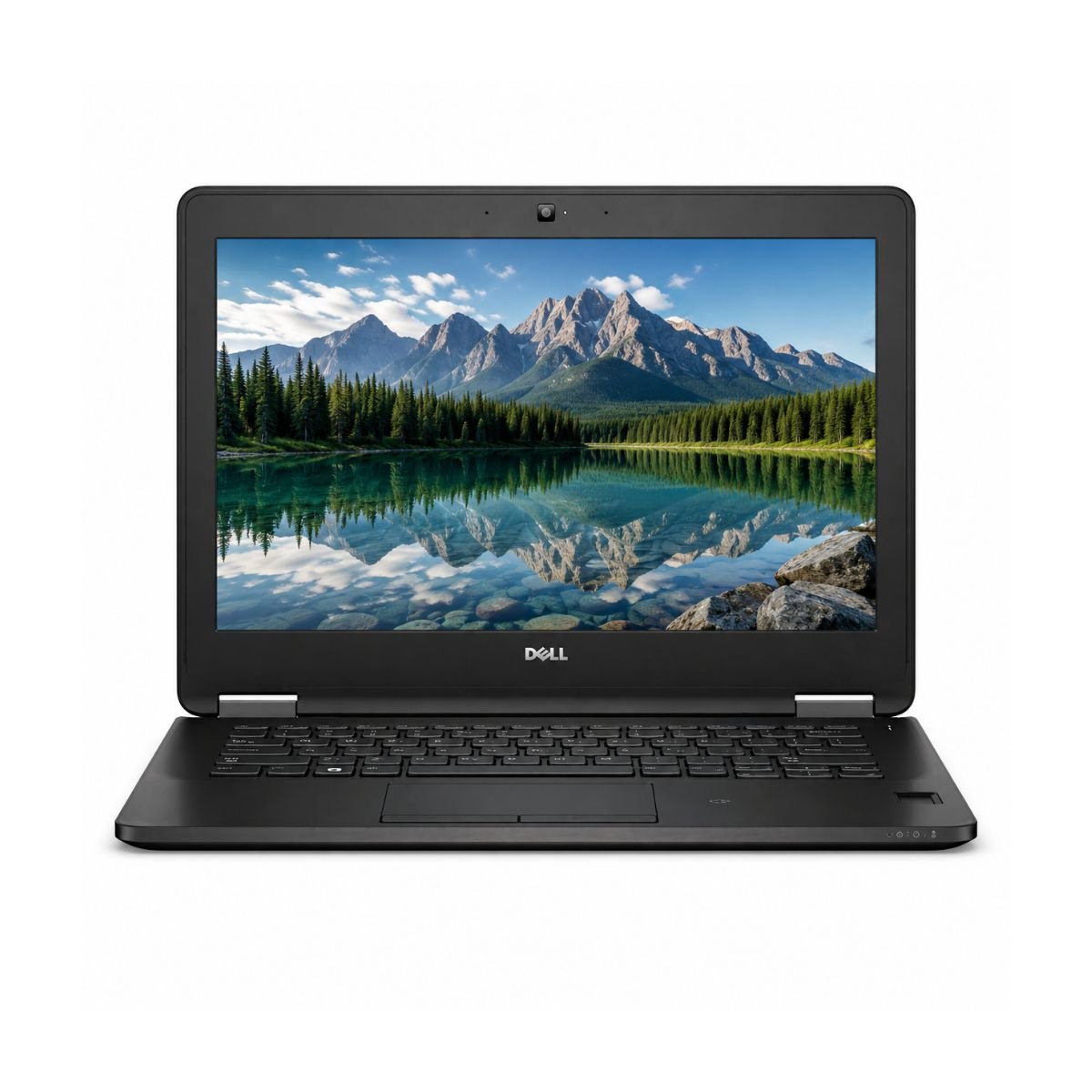
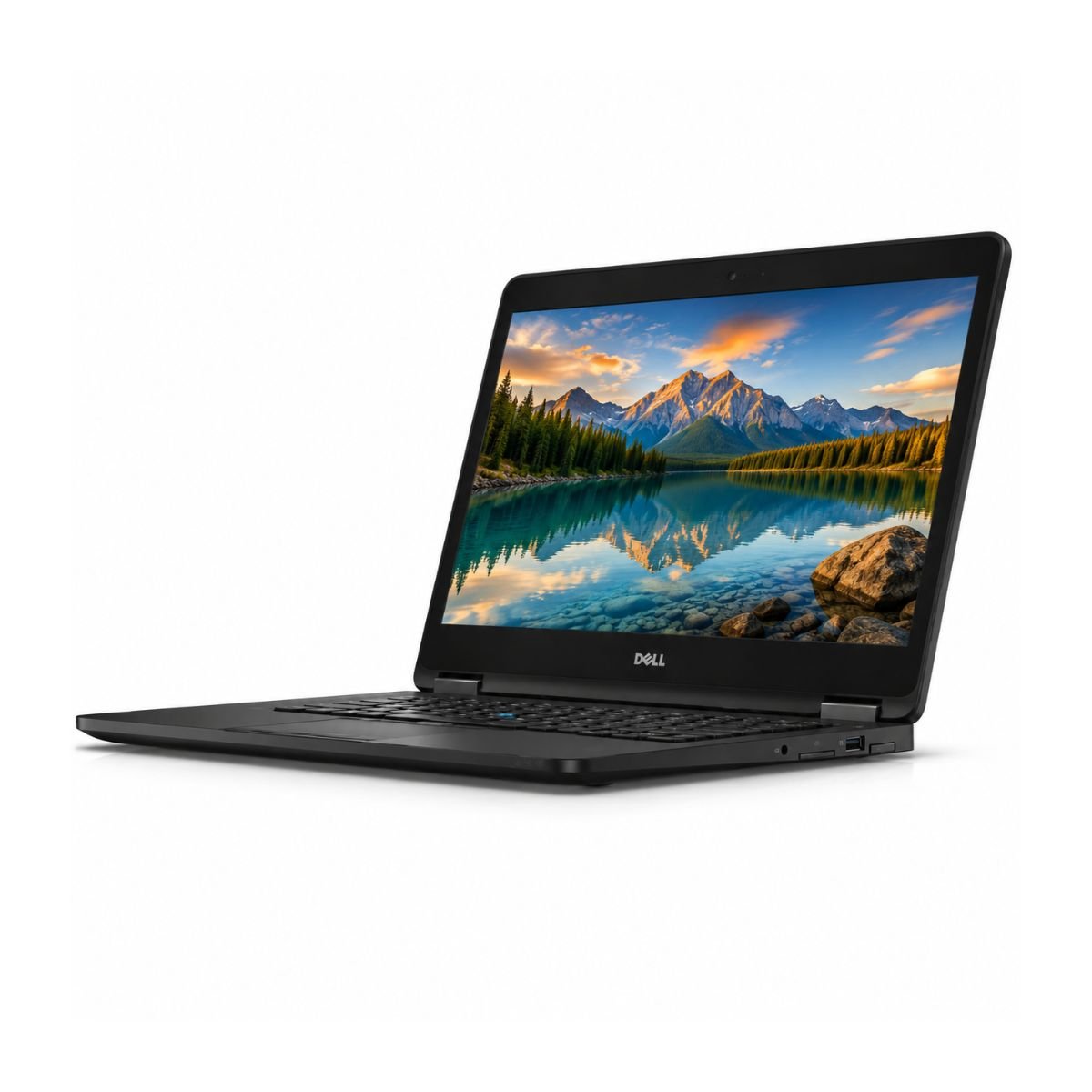
The design of this machine reflects Dell’s classic business-laptop language: understated, functional, and built to survive years of office use rather than to turn heads. The build material feels solid rather than flashy, with a chassis that resists flexing when picked up with one hand.
Durability is one of this laptop’s strongest selling points. Business-grade Latitude models are generally put through internal stress testing at the factory, and it shows in how the hinges, ports, and keyboard deck hold up over time.
At around 1.3 kg, the weight sits comfortably in the “easy to carry” category, and portability is genuinely one of its biggest advantages — it slips into almost any bag without adding noticeable bulk. There’s a premium feel to the Premium business-grade chassis. lid and palm rest, which is a nice surprise for a device in this price bracket.
The keyboard offers a comfortable amount of key travel with a soft, quiet action, which office typists tend to appreciate. The trackpad is responsive enough for everyday navigation, though it isn’t the giant glass surface you’d find on newer premium ultrabooks. The hinges feel tight and well-damped, opening smoothly with a single finger and holding the screen firmly at any angle.
Spill resistance and MIL-STD certification details for this specific used unit were not confirmed in the specification sheet provided, so we’re not making claims either way on those two points — more on that in the note at the end of this article.
Display Experience
The Dell Latitude E7270 comes with a 12.5-inch screen, which keeps the overall footprint small and travel-friendly. The 12.5-inch display provides clear visuals for everyday work, web browsing, and office tasks. Display quality may vary depending on the installed panel configuration.
Brightness levels are adequate for indoor office lighting and most home environments, though very sunny outdoor conditions can make the screen a bit harder to read — a common trait for laptops in this class. Color accuracy is good enough for everyday documents, spreadsheets, presentations, and web browsing, without being a match for dedicated color-critical displays.
There’s an anti-glare coating on the panel, which helps cut down reflections under office lighting or near windows. This particular configuration does not include a touchscreen, and there’s no 360-degree hinge, so it functions strictly as a traditional clamshell laptop rather than a convertible.
For outdoor visibility, expect decent readability in shaded areas, with reduced clarity in direct, bright sunlight.
Performance & Processor
Is this laptop fast enough? For everyday tasks, yes. The Intel Core i5 processor — a 6th generation chip — pairs with 8GB of DDR4 RAM to keep things moving smoothly through normal workloads. This is the same Core i5 family that powered a huge number of business laptops during its era, and it remains reliable for non-demanding work.
The 256GB SSD is where a lot of the everyday speed comes from. Boot speed is quick, typically getting you from power-on to desktop in well under 20 seconds, and Windows performance in general feels responsive rather than sluggish.
Browser performance is smooth with several tabs open, and everyday Office Work — Word, Excel, PowerPoint — runs without hiccups. Multitasking between a browser, a document, and a chat app is handled comfortably, though heavier multitasking with many large applications open at once will show the machine’s age.
For programming, this setup is genuinely capable for lightweight development work: text editors, IDEs for scripting languages, and basic local testing environments run fine, though large compile jobs or heavy virtual machines will test its limits.
Daily usage scenarios — emails, note-taking, web research, document editing — all feel natural. Online classes run smoothly, and popular accounting software used by small businesses performs well thanks to the fast SSD and adequate RAM. Video calls on Zoom or Google Meet are handled without major issues, provided you’re not simultaneously running several other heavy applications.
Graphics Performance
This model relies entirely on Intel‘s integrated GPU — the Intel HD 520 — since there’s no dedicated graphics card in this configuration. For everyday visual tasks, that’s actually enough.
Video playback, including 1080p content, is smooth on YouTube streaming and other standard video platforms. Light photo work in Photoshop or design work in Canva is manageable, especially for resizing, cropping, basic color adjustments, and simple layouts — just don’t expect it to handle massive multi-layer files with ease.
Light editing tasks, like touching up a batch of photos or making simple graphics for social media, work reasonably well. Casual gaming — think older titles, browser games, or simple 2D games — runs fine, but this integrated GPU has clear limitations: modern AAA titles and demanding 3D games are outside its comfort zone. Learn more about Intel integrated graphics for everyday productivity and multimedia.
Battery Life
Battery backup on this unit is rated at up to 2 hours, which is on the lower end and reflects the age and used condition of the battery cell. Charging time is reasonably quick given the smaller battery capacity, so topping it back up between meetings or classes doesn’t take long.
For office usage where the laptop stays plugged in at a desk most of the day, this isn’t a major concern. For travel, it’s worth carrying the charger, since 2 hours won’t comfortably cover a full day away from a power outlet.
Because this is a used unit, battery health naturally isn’t the same as a brand-new machine — this is normal for any pre-owned device and is factored into the price and the honest battery estimate listed above.
Connectivity & Ports
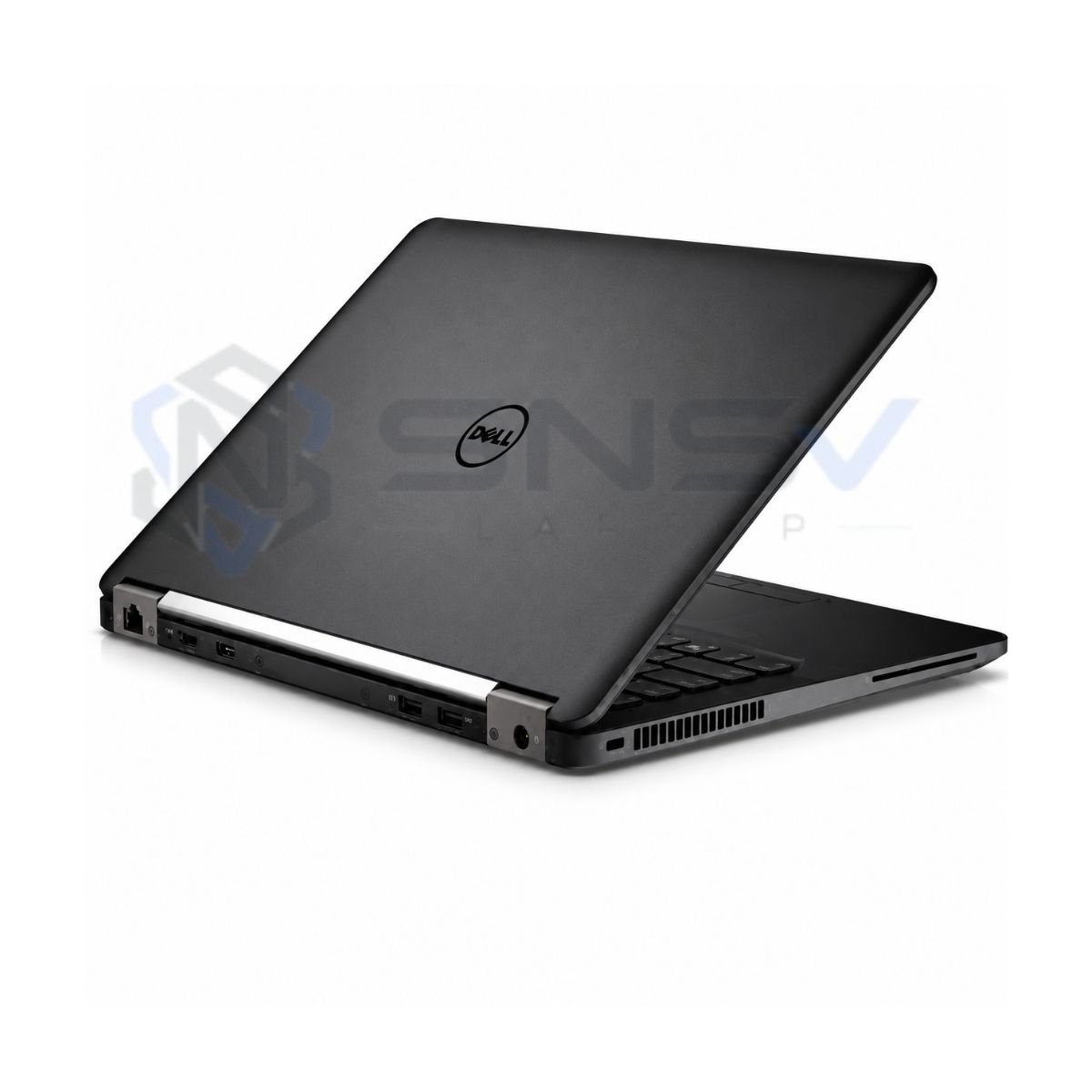
Connectivity is one of the practical strengths of this Dell Latitude. HDMI output makes it easy to connect to an external monitor or projector, and External monitor support is available through the video output provided on the installed configuration.
There’s a built-in Ethernet port, which is a genuine advantage for offices or homes where a stable wired connection matters more than Wi-Fi convenience. Wireless connectivity is handled through Wi-Fi supporting the 802.11ac standard, giving solid wireless speeds for browsing, streaming, and video calls, alongside Bluetooth for wireless mice, keyboards, and headsets.
The built-in webcam covers video calls without needing an external camera, and there’s a standard audio jack for headphones or a headset.
User Experience
This is where the Dell Latitude E7270 quietly earns its keep. The keyboard experience is genuinely comfortable, with well-spaced keys and a satisfying amount of travel that makes long typing sessions less tiring. Typing comfort is a real highlight here — this is a business laptop built by people who understood that typing all day is the job.
The touchpad handles cursor movement and basic gestures reliably, even if it’s smaller than what you’d find on newer machines. Built-in speakers are functional for calls, video playback, and casual listening, though they won’t replace external speakers for music lovers. Webcam quality is serviceable for video meetings — clear enough for professional calls without needing extra lighting equipment.
The microphone picks up voice clearly for calls and online classes. Cooling is handled by an internal fan system that keeps temperatures under control during normal use, and fan noise stays reasonably quiet most of the time, only becoming noticeable under heavier workloads.
Who Should Buy This Laptop?
- Students — great for note-taking, research, assignments, and online classes.
- Office Users — reliable for spreadsheets, documents, email, and daily office software.
- Freelancers — enough power for writing, client communication, and light design work.
- Teachers — solid for lesson planning, video calls, and grading digitally.
- Business Owners — a dependable secondary or backup machine for admin tasks.
- Developers — capable for lightweight coding and scripting work.
- Online Meetings — smooth performance on Zoom and Google Meet.
- Work From Home — comfortable keyboard and solid connectivity for daily WFH tasks.
- Basic Editing — fine for simple photo touch-ups and document formatting.
- Home Users — a practical everyday laptop for browsing, streaming, and general use.
Pros & Cons
Pros
- ✔ Fast SSD
- ✔ Good Build
- ✔ Lightweight
- ✔ Reliable
- ✔ Comfortable Keyboard
Cons
- ✘ Battery only around 2 hours
- ✘ Not for AAA Gaming
- ✘ No Dedicated GPU
Why Buy From SNSV Laptop?
- Genuine Products — every unit sold is authentic, with no counterfeit parts.
- Tested Devices — each device goes through checks before it’s listed for sale.
- Competitive Prices — fair pricing for the condition and specification offered.
- Secure Payment — safe and straightforward checkout options.
- Fast Delivery — quick dispatch so you’re not left waiting.
- Customer Support — real help available if questions come up before or after purchase.
- Warranty — backed by the stated checking warranty period for peace of mind.
- Easy Ordering — a simple, no-hassle buying process from start to finish.
Explore our complete range of Used Laptops in Pakistan, including Dell, HP, Lenovo, Microsoft Surface, Toshiba, and Apple MacBooks.
Frequently Asked Questions
Is the Dell Latitude E7270 worth buying? Yes, especially for buyers who want a reliable business laptop for everyday tasks like browsing, office work, and video calls, without paying full price for a new machine.
Is this laptop good for students? Yes. It handles note-taking, research, assignments, and online classes comfortably, and its lightweight makes it easy to carry to campus.
Can this laptop run Windows 11? It ships with Windows 10 Pro, and while 6th generation Intel Core i5 processors don’t officially meet Microsoft’s stated hardware requirements for Windows 11, some users install it through workaround methods. Sticking with Windows 10 is the more stable, fully supported option for this hardware.
Can it run Photoshop? Yes, for light photo editing tasks like cropping, resizing, and basic adjustments. Heavier, multi-layer projects will feel slower due to the integrated graphics.
Is this laptop good for programming? It’s suitable for lightweight coding, scripting, and small development projects. Larger compiling tasks or resource-heavy IDEs may run slower.
Can it handle Zoom meetings? Yes, video calls on Zoom and Google Meet run smoothly under normal conditions, thanks to the built-in webcam, microphone, and stable Wi-Fi connectivity.
Can it play games? Only casual or older, less demanding titles. It’s not built for modern AAA gaming since it relies on integrated graphics rather than a dedicated GPU.
Does it have an SSD? Yes, it comes with a 256GB SSD, which is a big part of why boot times and everyday performance feel fast.
Does it support an external monitor? Yes, through its HDMI port, and depending on the exact port configuration, possibly through DisplayPort as well.
How long does the battery last? This unit’s battery backup is rated at up to 2 hours, which reflects its used condition, so it’s best suited to plugged-in office use or trips where a charger is handy.
Does it have Bluetooth and Wi-Fi? Yes, it includes both Bluetooth for wireless accessories and Wi-Fi with 802.11ac support for fast wireless connectivity.
Is it a good laptop for online classes? Yes, the combination of a working webcam, clear microphone, stable connectivity, and smooth everyday performance makes it a solid pick for remote learning.
Final Verdict
If you’re looking for a reliable business laptop under budget, the Dell Latitude E7270 is a solid choice. It offers smooth everyday performance thanks to its 6th Gen Intel Core i5 processor and fast SSD, a durable business-grade build, and dependable day-to-day usability. It’s well suited for students, office professionals, freelancers, teachers, and small business owners who need a trustworthy device for work, study, and communication — just not for gaming or heavy creative workloads.
Why Choose This Model Instead of Others?
Compared to similarly priced alternatives, this Dell Latitude offers excellent value compared with:
- HP EliteBook 840 G7
- Dell Latitude 5400
- Lenovo ThinkPad T480
- Microsoft Surface Laptop 2
While those models each have their own strengths, this E7270 configuration stands out for its combination of a fast SSD, business-grade durability, and a genuinely comfortable keyboard — all at a lower price point thanks to its used condition.
Buying Guide
Choose this laptop if you need:
- ✔ Office Work
- ✔ Online Classes
- ✔ Microsoft Office
- ✔ Zoom
- ✔ Web Browsing
- ✔ Accounting
- ✔ Study
- ✔ Freelancing
Don’t choose it if you need:
- ✘ Heavy Gaming
- ✘ 4K Editing
- ✘ 3D Rendering

Reviews
There are no reviews yet.